Creational Design Patterns in Java
Design Patterns are reusable solutions in software development. By utilising design patterns developers can communicate their approaches to problem solving more effectively.They are more like guidelines or a model for solving technical problems.We use these patterns during analysis & requirement phase of software development life cycle.
There are 3 types of design patterns:
Creational Design Pattern
Structural Design Pattern
Behavioral Design Pattern
In this blog we will learn about Creational design patterns and its few types.
Creational Design Patterns:
These patterns focus on process of creating objects. They aim to enhance flexibility and efficiency in object creation, allowing systems to remain independent of how their objects are constructed, composed and represented.
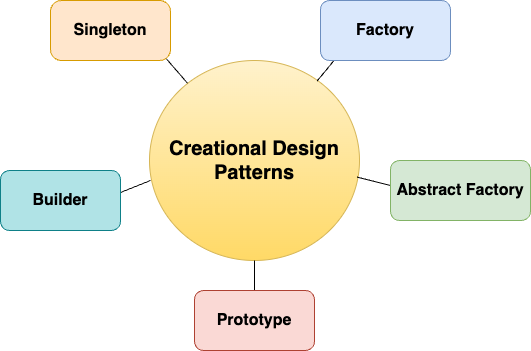
There are 5 types in Creational Design Patterns - Singleton, Factory, Abstract Factory, Builder and Prototype. We will discuss about few patterns in detail in this blog.
Singleton Design Pattern:
The Singleton Design Pattern ensures a class has only one instance and provides a global access point to it. We can use this pattern when you need to ensure there exists only one instance in application also when you want to provide a way to access that instance from a specific location in code. We often use these in situations like logging, managing database connections, caching data.
Example:
public class Singleton {
    private static final Singleton instance = new Singleton();

    private Singleton() {
    }

    public static Singleton getInstance() {
        return instance;
    }

    public void showMessage() {
        System.out.println("Singleton Class!");
    }
}

public class Main {
    public static void main(String[] args) {
        Singleton singleton = Singleton.getInstance();
        singleton.showMessage();
    }
}
In the above example, The constructor of the Singleton class is private, which prevents other classes from instantiating it directly. A private static instance of the class is created. This instance is created eagerly when the class is loaded. The getInstance() method provides a global access point to the instance. It returns the single instance of the class. In the Main class, you can get the instance of the Singleton class and call its methods(here we are calling showMessage()).
Factory Method Design Pattern:
Factory Design Pattern provides an interface for creating objects in a superclass, allowing subclasses to alter the type of objects that will be created. This pattern is useful when the exact types of objects to be created may vary or need to be determined at runtime. It promotes loose-coupling between object creator and the objects themselves.
Example: Let's create a simple example involving a Shape interface and concrete classes for different shapes. We will then implement a ShapeFactory that uses the factory method to create shapes.
// Create the Shape Interface
public interface Shape {
    void draw();
}

// Create Concrete Classes
public class Circle implements Shape {
    @Override
    public void draw() {
        System.out.println("Drawing a Circle");
    }
}

public class Square implements Shape {
    @Override
    public void draw() {
        System.out.println("Drawing a Square");
    }
}

// Create the ShapeFactory Class
public abstract class ShapeFactory {
    // Factory method
    public abstract Shape createShape();

    // Method to use the created shape
    public void drawShape() {
        Shape shape = createShape();
        shape.draw();
    }
}

// Create Concrete Factories
public class CircleFactory extends ShapeFactory {
    @Override
    public Shape createShape() {
        return new Circle();
    }
}

public class SquareFactory extends ShapeFactory {
    @Override
    public Shape createShape() {
        return new Square();
    }
}

// Use the Factory Method
public class Main {
    public static void main(String[] args) {
        ShapeFactory circleFactory = new CircleFactory();
        circleFactory.drawShape(); // Output: Drawing a Circle

        ShapeFactory squareFactory = new SquareFactory();
        squareFactory.drawShape(); // Output: Drawing a Square
    }
}
In the above example, Shape interface defines a method draw() that all concrete shapes will implement. Circle and Square are concrete implementations of the Shape interface, providing their own implementations of the draw() method. ShapeFactory Abstract class declares the factory method createShape(), which is responsible for creating Shape objects. It also has a method drawShape() that uses the factory method to create a shape and then calls its draw() method. CircleFactory and SquareFactory extend the ShapeFactory class and implement the createShape() method to return instances of Circle and Square, respectively. In the Main class, we create instances of the concrete factories and call the drawShape() method, which internally uses the factory method to create and draw the shapes.
Builder Design Pattern:
Builder Design Pattern is used to create complex objects step by step. This pattern separates the construction of a complex object from its representation, allowing the same construction process to create different representations. It provides a clear and readable way to create objects with many parameters, especially when some parameters are optional. This pattern enhances code readability and maintainability.
Example: Let's create a simple example of a Pizza class that can be built using a PizzaBuilder. The Pizza class will have various attributes like size, cheese, and toppings.
public class Pizza {
    private String size;
    private boolean cheese;
    private String toppings;

    private Pizza(PizzaBuilder builder) {
        this.size = builder.size;
        this.cheese = builder.cheese;
        this.toppings = builder.toppings;
    }

    @Override
    public String toString() {
        return "Pizza{" +
                "size='" + size + '\'' +
                ", cheese=" + cheese +
                ", toppings='" + toppings + '\'' +
                '}';
    }

    public static class PizzaBuilder {
        private String size;
        private boolean cheese;
        private String toppings;

        public PizzaBuilder setSize(String size) {
            this.size = size;
            return this;
        }

        public PizzaBuilder setCheese(boolean cheese) {
            this.cheese = cheese;
            return this;
        }

        public PizzaBuilder setToppings(String toppings) {
            this.toppings = toppings;
            return this;
        }

        public Pizza build() {
            return new Pizza(this);
        }
    }
}

public class Main {
    public static void main(String[] args) {
        Pizza pizza = new Pizza.PizzaBuilder()
                .setSize("Large")
                .setCheese(true)
                .setToppings("Pepperoni, Olives")
                .build();

        System.out.println(pizza);
    }
}
In the above example, Pizza class represents the complex object we want to build. It has attributes like size, cheese, and toppings. The constructor is private to enforce the use of the builder. PizzaBuilder static inner class provides methods to set the attributes of the Pizza class. Each method returns the builder itself (this), allowing for method chaining. The build() method creates a new Pizza instance using the builder's attributes. In the Main class, we create a Pizza instance using the PizzaBuilder. We set the size, cheese, and toppings, and then call the build() method to create the Pizza object.
Thank you for reading!